Page 38 of 60
Posted: Fri Jul 31, 2009 4:49 am
by Qloof234
"You cannot eat this item here, it is too big."
*shot*
Posted: Tue Aug 18, 2009 1:22 pm
by Emerald141
Posted: Tue Aug 18, 2009 8:19 pm
by bround
Emerald141 wrote:Cbloopy? Are you still alive?
Is it possible to make a level uncheatable, like At the End of it All and the four Rainbow levels? I think it would be useful in QftRS.

Hex-edit it.
Posted: Tue Aug 18, 2009 8:24 pm
by maxnick
bround wrote:Emerald141 wrote:Cbloopy? Are you still alive?
Is it possible to make a level uncheatable, like At the End of it All and the four Rainbow levels? I think it would be useful in QftRS.
Hex-edit it.
I don't think you understood the question...

Posted: Wed Aug 19, 2009 1:51 am
by DEEMAN223344
Posted: Wed Aug 19, 2009 6:50 am
by Qloof234
I never even noticed that before. Good observation!
One other thing catches my eye there - directly above TextureName is another variable unused in the final version of Adventures or the editor - WaterReact.
It's been forever since I hacked a .WOP file, but I'm going to see if that value is still in the editor and what it does.
Assuming it does something, since there's no movement power in the game now (unused white magic in WA demo build).
Posted: Wed Aug 19, 2009 2:57 pm
by maxnick
Posted: Thu Aug 20, 2009 8:03 am
by Qloof234
Hmmm... That's a possibility. Question is more of if the Movement value works with barrels.
Posted: Fri Aug 21, 2009 2:12 am
by Qloof234
D-P
Tried putting in the WaterReact variable... Who wants to guess what happened?
EDIT: Okay, I figured out what I did wrong (I phail at counting now too), accidentally put two spaces between variables instead of 3.
I got it to show up in the editor. Kind of.
Instead of saying WaterReact then a number, the variable just says WaterRe, with no numbers there.

There's also a More button, but there's nothing on the next page.
No idea what I did wrong this time... Maybe I overwrote the act part of WaterReact? Hm.
Cbloopy, d'you think you would be able to take a look? Please?

Posted: Fri Aug 21, 2009 2:29 am
by Qloof234
T-P
Okay, I feel really special right now, because I was trying to insert a model into the wg.exe of the editor (which failed, I dunno why I was trying to begin with), but I found out something else.
Using XVI32, if I search Obstacle and scroll down, I can find a bunch of strings of text from adventures (Careful! Stinkers are flammable!, etc.).
I was bored so I found the TollGate one and changed the word "Toll" to "Exit".
Guess what? In game, it now says "This ExitGate will open at the cost of (#) coins."!
Interesting, huh? It can be used to give the game completely different lines when the player loses.
I also learned I need to edit the Editor.exe file to insert custom models
Posted: Fri Aug 21, 2009 8:15 am
by Qloof234
Q-P. What's wrong with me?!?

Okay, everyone remembers how it seems impossible to edit the Hub area save game text in MoFI, apart from blanking it out?
It's actually quite simple.
1) Open up wg.exe (from the MoFI folder) in XVI32 or the like.
2) Search for the string Wonderfalls or Fire Island (any hub area name works). You should end up with a whole bunch of strings like this:
Code: Select all
Fire Island Wonderfalls Caves Behind Wonderfalls Fire Island Beach Fire Island Jungle Makeshift Camp Jungle Canyon A Strange Place Kaboom! Village Jungle Temple Secret Bonus Area A Void In Time Beneath The Volcano Acid Pools Pirate Crew Camp Sundog Island Abandoned Stinker Mine Ice Troll Fortress
[This is preceded by hat_bone 0 (something to do with stinker cap placement I assume) and followed by a bunch of texture paths.]
3) Change whichever area name you want to whatever you want (NOTE: I DO NOT KNOW IF NAME LENGTH PLAYS A ROLE HERE), for example I changed
to
4) Save changes to wg.exe (You might want to actually save this as a different .exe file in case something goes wrong).
5) Play the game, make a save in the intended area/choose a save in the intended area...

Voila! It works!
Posted: Mon Aug 24, 2009 7:10 am
by andyhilbert
What does CMD 8 do?
Posted: Mon Aug 24, 2009 8:40 am
by Qloof234
CMD 8 starts Adventure #Data1.

Posted: Mon Aug 24, 2009 8:03 pm
by andyhilbert
But it only does numbers, not names. I really don't understand CMD 8 but I think other people use it and I wan't to aswell. The adventures I make would be much better!
Posted: Mon Aug 24, 2009 8:23 pm
by Qloof234
Okay, let me try explaining a bit better.
In the Adventures data in both WA and MoFI, each folder is called Adventure(#).
The game recognizes the number at the end of the name, so with CMD 8...
Code: Select all
CMD: 8
Data1: (#)
Data2:
Data3:
Data4:
If you put in one of the end numbers from a folder name, and initiate the command, you will be teleported into that adventure.
If the number is unused, then the game will MAV.
Hope this helps a bit more than last time.
Posted: Tue Aug 25, 2009 2:27 am
by MyNameIsKooky
Hey, I was Hex-Editing the wg.exe of the WA Custom Level Player, and I found a bagel!
Well, sadly, it actually wasn't a bagel, but it was something as good as a bagel!
Starting at address 1CCDAC, there is some text that is displayed in-game that you can edit, like Qloof found.
Also, I think I might know how to make the game say, "You cannot eat this item here."

-END OF BAGEL-
.
.
Posted: Sat Aug 29, 2009 11:10 am
by bround
MyNameIsKooky wrote:Also, I think I might know how to make the game say, "You cannot eat this item here."
If you know, how?
I know how, but im not telling.
Posted: Sat Aug 29, 2009 11:16 am
by Emerald141
Posted: Sat Aug 29, 2009 6:08 pm
by MyNameIsKooky
bround wrote:MyNameIsKooky wrote:Also, I think I might know how to make the game say, "You cannot eat this item here."
If you know, how?
I know how, but im not telling.
I know how. Hex-Edit the wg.exe.
Posted: Sun Aug 30, 2009 12:01 am
by CatHat5678
Emerald141 wrote:Could someone post the Wysp texture so I can create Shimmer for QftRS?
sure!
Posted: Sun Aug 30, 2009 1:05 am
by LittleZbot
Qloof234 wrote:Okay, let me try explaining a bit better.
In the Adventures data in both WA and MoFI, each folder is called Adventure(#).
The game recognizes the number at the end of the name, so with CMD 8...
Code: Select all
CMD: 8
Data1: (#)
Data2:
Data3:
Data4:
If you put in one of the end numbers from a folder name, and initiate the command, you will be teleported into that adventure.
If the number is unused, then the game will MAV.
Hope this helps a bit more than last time.
How do we tell it to play a MOFI Adventure or WA Adventure? Like, if I want to make MOFI lvl 1, how do I tell it to do MOFI?
Posted: Sun Aug 30, 2009 1:27 am
by Qloof234
Are you talking about in the editor? Or in the MoFI Demo?
In the Editor, as we know, it's impossible to get it to play a MoFI level with the proper elements. I don't recommend using it in the editor, because it'll probably just MAV the game (unless you have adventures in the proper folders).
As for in MoFI, there's no difference between the level formats, if they don't have MoFI elements.
Posted: Sun Aug 30, 2009 2:23 am
by LittleZbot
Qloof234 wrote:Are you talking about in the editor? Or in the MoFI Demo?
In the Editor, as we know, it's impossible to get it to play a MoFI level with the proper elements. I don't recommend using it in the editor, because it'll probably just MAV the game (unless you have adventures in the proper folders).
As for in MoFI, there's no difference between the level formats, if they don't have MoFI elements.
I'm talking about the Editor. If I use Command 8, will it start a MOFI or WA adventure?

Posted: Sun Aug 30, 2009 2:32 am
by Qloof234
So you mean that if you moved an official adventure into the correct directory for the editor and used CMD 8, would it load the adventure?
Hmmm... I don't think it would load, because WA levels don't work in the Editor unless you've used cbloopy's converter (if you do that it might work), and MoFI levels won't load because of the extra data (empty bytes) in them and the new elements.
Posted: Sun Aug 30, 2009 4:12 am
by LittleZbot
Qloof234 wrote:Okay, let me try explaining a bit better.
In the Adventures data in both WA and MoFI, each folder is called Adventure(#).
The game recognizes the number at the end of the name, so with CMD 8...
Code: Select all
CMD: 8
Data1: (#)
Data2:
Data3:
Data4:
If you put in one of the end numbers from a folder name, and initiate the command, you will be teleported into that adventure.
If the number is unused, then the game will MAV.
Hope this helps a bit more than last time.
You said that CMD 8 started an Adventure from MOFI or WA. I don't understand.
Posted: Sun Aug 30, 2009 4:17 am
by Qloof234
No, I mean that if it were used in WA or MoFI, it would load the adventure in question (e.g. using Data1: 15 for example would load whatever is in the Data/Adventures/Adventure15 folder of the game).
Posted: Sun Aug 30, 2009 5:36 am
by LittleZbot
What happens if you use it in the Editor?
Posted: Sun Aug 30, 2009 5:47 am
by CatHat5678
you cant put hubs in the editor
Posted: Sun Aug 30, 2009 10:06 am
by Emerald141
Posted: Sun Aug 30, 2009 10:40 am
by bround
Emerald141 wrote:Actually, you don't need hubs to use Command 8. You just need the corresponding adventure folder in Data/Adventures.
Correct me if I'm wrong.
You need to create a "Adventure" folder there first.
gonna go away - -
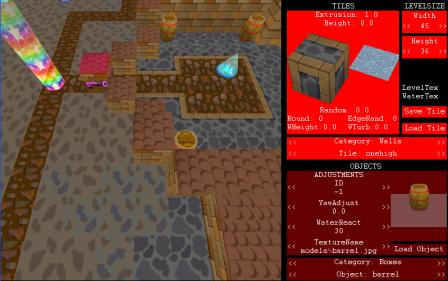 Look carefully, MS was showing us Texturename before WA1 was even out.


