Page 5 of 6
Posted: Sun Dec 01, 2013 9:54 pm
by Fluffshery
Qloof234 wrote: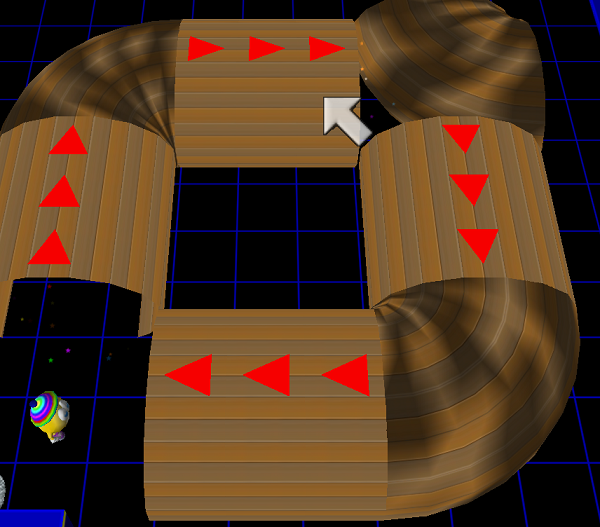
Well, ignoring the incorrect rotation on the top-right one, this confirms that it's possible to switch the model name for anyone proficient enough with a Hex editor.
This also confirms that suction tubes look kind of... weird when they aren't using the Z-Bot gates.

Cool!

What did you change and where?
Posted: Sun Dec 01, 2013 11:04 pm
by LexieTheFox
Krishiv738 wrote:LexieTheFox wrote:Armed with that knowledge, does anyone know (I know, it's relatively new. I'm trying myself to find this out, but just incase)
Does anyone know what to set Stars End to with Cmd 12 to make it slow down to a shocking like aspect? I'm using it for something that happens at the Mythical Summit. But when I fired the cmd all it did was "erase" the music entirely.
Dd you set the volume or remained it 0?
Volume: 10
Speed: 5, then changed to 3.
Wooh, suction tube corners!
Posted: Mon Dec 02, 2013 1:10 am
by Qloof234
Fluffshery wrote:Cool!
What did you change and where?
It'll make some PoTZ levels incompatible with the Player, and I'd recommend making a backup of wg.exe in case something goes wrong.
You'll need a HEX editor, by the way. It's quite straightforward - In the wg.exe file, there's a collection of shorthand model names (!FlipBridge, !Suctube, !WaterFall, etc.). In there, you should find the following pattern (note that you can't copy-paste this into the search function, it won't work - just search for !SuctubeX):
Code: Select all
!FloingBubble !Spring !Suctube !SuctubeX !FlipBridge !WaterFall !Star
Just replace "!SuctubeX" with "!TubeCorn" - These names are case-sensitive, and I don't think you can add more characters to a model-name. The .wop file and Editor Tools conversion data text file are in the attached zip.
Data values for Tube Corners:
Data2 - Direction (which ends of tube are open): 0 - down/right, 1 - down/left, 2 - up/left, 3 - up/right
Data3 - Skin (uses same values as the regular suction tube)
YawAdjust (MUST BE SET SEPARATELY FOR MODEL TO FACE CORRECT DIRECTION): 0.0 - down/right, 270.0 - down-left, 180.0 - up/left, 90.0 - up/right
As this change requires editing the game's .exe file, I'm not going to add it to the main package. Instead, I'll put a link to this post in the first one, for people to check if they're interested.
Posted: Mon Dec 02, 2013 4:08 am
by Fluffshery
Yes! I got it to work! Thank you!
Posted: Mon Dec 02, 2013 9:15 am
by Krishiv738
LexieTheFox wrote:Krishiv738 wrote:LexieTheFox wrote:Armed with that knowledge, does anyone know (I know, it's relatively new. I'm trying myself to find this out, but just incase)
Does anyone know what to set Stars End to with Cmd 12 to make it slow down to a shocking like aspect? I'm using it for something that happens at the Mythical Summit. But when I fired the cmd all it did was "erase" the music entirely.
Dd you set the volume or remained it 0?
Volume: 10
Speed: 5, then changed to 3.
Wooh, suction tube corners!
Volume 10 makes very little sound so make it above.volume doesn't increase it but it adjusts it.Normal music has volume of 50 which is okay.
50+ volume is higher volume and
50- is lower volume.
This applies to speed also.
This command needs tens place.
Posted: Mon Dec 02, 2013 10:50 am
by Krishiv738
update the wop notes again because
the cmd 12
data1: volume (50 is default)
data2: ???
data3: speed (50 is default)
data4: ???
zap bot
data1:direction
data4:follow path
oops ,found out this

that's a floing bubble model in logic of static
model:!FloingBubble
also this

that's the rainbow portal without frame
model:!Portal Warp
this too

that's a mofi map,a model not a pic from Generic Square
model:!SkyMachineMap
Posted: Tue Dec 03, 2013 1:03 pm
by Krishiv738
i found that the glowworms that have z-bot like paths(goes straight and when it hits a different texture floor or wall, it turns in any direction) are called Zippers.
model:!Zipper
also the star summit is at 37.wlv
I found that NPC Stars have data1 which changes the skin.
Zipper HERe
Posted: Fri Dec 06, 2013 11:39 am
by Blazeknight
How do I get the rainbow portal to work? Is it from a suction tube leading to an arrow or a separate wop?
Posted: Fri Dec 06, 2013 9:13 pm
by Qloof234
It's a separate .wop. I didn't bother looking into it because it behaves pretty much the same as a level-exit arrow, it'd be easy enough to swap it out for the Portal model once the WA3 Editor is out.
Posted: Sat Dec 07, 2013 1:36 pm
by Krishiv738
Blazeknight wrote:How do I get the rainbow portal to work? Is it from a suction tube leading to an arrow or a separate wop?
Rainbow portal has two parts,
Entrance(Frame):behaves like suction tube with no particles.
Warp:it doesn't behave like suction tube but when player is flying through it,it just changes the level,also it has different logic.(see my warp picture above)
Also entrance and the warp has different wops not same wops,the picture I posted has logic of none.
Posted: Sat Dec 07, 2013 2:34 pm
by Blazeknight
Can I get a wop of it... I think I haven't found one in the potz wop folders or a convertable swap form of a level exit? Or to put it simpler, can someone tell me how to get that blue arch and the rainbow semicircular tube in a potz player wlv?
Posted: Sun Dec 08, 2013 4:23 am
by Krishiv738
Blazeknight wrote:Can I get a wop of it... I think I haven't found one in the potz wop folders or a convertable swap form of a level exit? Or to put it simpler, can someone tell me how to get that blue arch and the rainbow semicircular tube in a potz player wlv?
I don't know logic of warp(rainbow circular tube)but I know the model:!Portal Warp.i don't know model and logic of blue arch,I will try finding the wlv around 37.wlv in POTZ hub.37.wlv is star summit.
Posted: Sat Dec 14, 2013 8:46 pm
by jdl
For anyone who is good at converting PotZ levels to load in the editor, Hub level 4.wlv seems to have a General Command button by the bridge that when stepped on plays a "Resistance is futile!" sound clip. So it seems that there is a command to play sounds.
I can't seem to convert the level correctly so if you have any success please post the command here!
Posted: Sat Dec 14, 2013 9:37 pm
by Qloof234
Sure, I'll take a look. It's probably not converting correctly because of the Suction Tube corners.
Also, are you using the MoFI model-hacked editor? It has a few of the Computers from MoFI in there, so it'll MAV the regular editor.
EDIT: Wait, no, I found out what's causing the crash.
There's a sign in the level that uses the "Z-Bot Sign" model, which the conversion tools don't support.
Posted: Sat Dec 14, 2013 9:44 pm
by Qloof234
DP.
Tracked it down - Command 10.
I have a hunch as to how values work on this, but I'm going to have to take a closer look. 149 is the "RESISTANCE IS FUTILE" sound, at any rate.
Posted: Sat Dec 14, 2013 10:18 pm
by dig 222
Does anyone know which number "ALL YOUR BASE ARE BELONG TO US" is?
Posted: Sat Dec 14, 2013 10:34 pm
by Qloof234
I'm still working on a complete list, but ALL YOUR BASE is 148.
Posted: Sat Dec 14, 2013 10:50 pm
by Pawelec
AutoDoor data values found!
These were tested for almost 2 hours and seem to be guessed right.
Data4: ActivateID
Data5: ActivateID
Data6: ActivateID
Data7: TimerMaxL
ActivateID is tricky:
set to 0 passes everything,
set to 1 and higher passes an object with specified ID,
set to -1 passes the player,
set to -2 and lower passes all objects with logic equal to the negative of given number (for -2 it passes all objects with logic equal to 2, for -430 it passes all objects with logic of 430, which is ZipBot logic). This means 1 is logic number of the player and that's why any object with logic of 1 MAVs upon sight - the engine doesn't know how to deal with more than one player object present in one .wlv, so it MAVs.
AcivateIDs may be different if you want few different objects to pass the AutoDoor. Order of ActivateIDs given makes no difference. Bear in mind that if you leave 0 in any of Data 4, 5 or 6 the AutoDoor will open for every object trying to pass it.
For example: an AutoDoor with Data4 set to -150, Data5 set to -1 and Data6 set to 4 will pass all the Scritters (logic 150), the player and all objects with ID set to 4.
TimerMaxL defines how long the AutoDoor remains open after the triggering object goes off its range of influence (which is 5x5 box around it, so the AutoDoor is in the middle).
Enjoy!
Posted: Sat Dec 14, 2013 11:22 pm
by Qloof234
Ooooooh, nice find! Going to make a note of that.
Posted: Sun Dec 15, 2013 12:06 am
by Krishiv738
Now the shard sounds from the star summit can be played but there is there is so data which controls pitch or it might not exist in data.
I am going to create a test adventure with 150 CDMA,that's a lot of work.
Find a pattern via Cmd data and backwards(Z-A) sound folder,Acpu#.wdf will be last, there are also some extra sounds which are modified gem sounds.(pitched up,down sounds).[This is wrong]We also found how the makes 'Wakka' sound when picked up a gem in Wakka Wakka levels,which means Cmd 10 exists in WA trilogy(WA,MoFI,POTZ)[\ this is wrong]This is a brief note about Cmd 10(my posts are always long posts)
Edit:when I was playing POTZ,my player was at star summit,suddenly I tripped and fell from the chair and mouse pointer pointed at invisible wall,I just moved to mouse pointer to right and found fake walls starting from the invisible wall,My player just blinked through walled it and moved forward annnd *click* a floor button is pressed!I also heard chomper noises coming from right.Maybe they are activating some CMD.
Edit2:Indeed there is a pattern,resistance is futile is Acpu9.wav
And all your base belongs to us at Acpu8.wav
Also there are 10 sounds left,must be shard or gem sounds.
Edit3:it's a POTZ Cmd not in MoFI or WA
Posted: Sun Dec 15, 2013 1:42 am
by Krishiv738
List deleted,download whole lis t from qloof
Posted: Sun Dec 15, 2013 1:43 am
by Qloof234
I've already put together a list of the sound files, though.
Attached below.
Posted: Sun Dec 15, 2013 1:44 am
by Krishiv738
We might be working at same time,but this is download free.
Posted: Sun Dec 15, 2013 1:45 am
by Qloof234
It's also incomplete.
Posted: Sun Dec 15, 2013 1:46 am
by Krishiv738
Qloof234 wrote:It's also incomplete.
What values are incomplete?
Posted: Sun Dec 15, 2013 1:50 am
by Qloof234
There are values between 160 and 199 as well as several others that you don't have, and for that matter, some of the entries on your list are incorrect - 31 is the "crackling fire" noise played on firetraps, not a "moving" noise.
Posted: Sun Dec 15, 2013 3:37 am
by Jutomi
Plus, I think 144 is "I AM ERROR" and 145 is "Does not compute!" though, I do admit, this is purely by my ears.
And I think it's "Chicken! Fight like a z-bot!" like from what stinkersquad's signature was a little while ago.
Posted: Sun Dec 15, 2013 5:01 pm
by dig 222
Jutomi wrote:Plus, I think 144 is "I AM ERROR" and 145 is "Does not compute!" though, I do admit, this is purely by my ears.
Hmm... I didn't hear either of those in POTZ.
Then again, I usually don't have the sound on.
Posted: Sun Dec 15, 2013 5:06 pm
by StinkerSquad01
You only hear them when you destroy a masterbot.
Posted: Mon Dec 16, 2013 10:47 am
by Krishiv738
106 is not nothing,its thwart and icetroll's footstep sound, I had full volume so I could hear that.
I also found Rainbow portal logic:b9-01
Rainbow portal has Data1 which controls skin(rainbow and space)