Page 7 of 14
Posted: Tue Apr 15, 2014 5:18 am
by Qloof234
Just checked - both the ID sharing and Shadow Stinker crash happen in the old Editor as well.
Posted: Tue Apr 15, 2014 12:06 pm
by Wonderman109
You say red stinkers change expression but don't actually freeze?

That would be great for MM III.
NVM I realized what you meant.
Posted: Tue Apr 15, 2014 4:39 pm
by MyNameIsKooky
Stinker NPCs with the same ID will assume the same expression when frozen. This bug has been around since WA1E. And like llarson said, that (unintentionally) happened in my Mr. Zurkon's Retarded Holiday adventure.
Posted: Tue Apr 15, 2014 8:44 pm
by Wonderman109
When something pops up on your screen while the editor is active on the monitor, and you're pressing a key to move the editor, when you return to it being active, it keeps moving that way when you release the keys. This can be resolved by saving and exiting and reopening it. This bug has definitely been around since WAE1, but I kept forgetting to report it.
Posted: Tue Apr 15, 2014 10:08 pm
by Qloof234
You can also resolve it by hitting that same key again.
Posted: Wed Apr 16, 2014 6:07 am
by Qloof234
DP.
Not a bug, but a feature request. I have a gaming mouse that I use for pretty much everything (one of those ones with buttons on the side), including the Editor. Sometimes, I run into an issue wherein I accidentally end up clicking a button on the side of the mouse.
Because of how it's assigned to my keyboard keys, the buttons that are near my thumb are the "tilt left/right" buttons in the Editor view. This generally ends up meaning I'll be hammering the two buttons until the view actually gets centred properly again. Would it be possible to add a "camera reset" button that reset the zoom/tilt to the default values?
Posted: Wed Apr 16, 2014 11:49 am
by jdl
Qloof234 wrote:Would it be possible to add a "camera reset" button that reset the zoom/tilt to the default values?
Yes, please. I would love it if this was added.

Posted: Sun Apr 20, 2014 2:14 am
by MyNameIsKooky
You can't add capital Z's to archive names.
Posted: Sun Apr 20, 2014 3:54 am
by Jutomi
That's the curse of the Z-bots.

Posted: Sun Apr 20, 2014 2:59 pm
by Wonderman109
This bug was around since WAE1 actually. I think Muzozavr discovered it.
Posted: Sun Apr 20, 2014 4:06 pm
by samuelthx
As exemplified in Wonderman's Terrorble Temple, if you re-flash a barrel too close to a ghost the barrel does not appear. You are free to flash something else, though. Perhaps this applies to other objects too?
Posted: Sun Apr 20, 2014 7:26 pm
by Wonderman109
I've been getting some random MAVs from my editor when I open wlvs too fast.
Also, playing and saving your game on one window size on the player then swapping to another or full-screen and re-loading causes a MAV.
Posted: Mon Apr 21, 2014 8:04 pm
by Pawelec
jdl wrote:Not sure if this is a bug or if it was intended but the new ?Default variable does not support rgb 0,0,0 for transparency, and .jpg files are the only kind of files it accepts.
I beg you MS, fix that! All my custom plant ideas are now just impossible to realize...
And just a minor thing: Brr-made ice floats have animation which Editor-placed ones haven't. Any way to make the Editor-placed ones have the animation too?
Posted: Mon Apr 21, 2014 8:43 pm
by Jutomi
That's the case in the actual game; I'm not sure if it's intentional or not.

And...
custom plant ideas?
I like the sounds of this so far...

Posted: Mon Apr 21, 2014 8:45 pm
by MyNameIsKooky
Pawelec wrote:And just a minor thing: Brr-made ice floats have animation which Editor-placed ones haven't. Any way to make the Editor-placed ones have the animation too?
I actually made a wop for myself that gives the ice floats the tilting animation. I suppose I'll post it here for anyone who wants it.
Posted: Mon Apr 21, 2014 9:03 pm
by Pawelec
Thanks MNIK! Now they look like they should.
Posted: Tue Apr 22, 2014 12:35 am
by Wonderman109
MyNameIsKooky wrote:Uh... This editor preview of the NPC is not accurate. The hat. THE HAT.
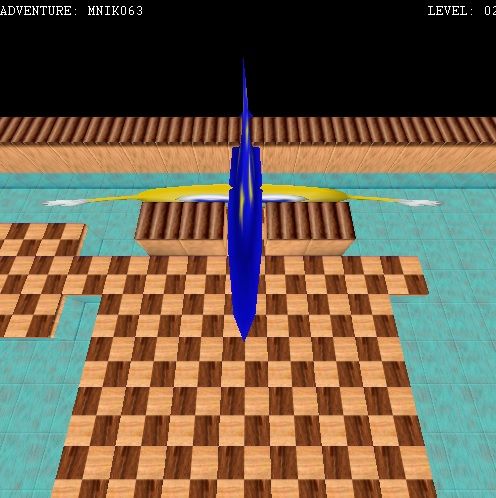
And I thought hat/glasses modeling was glitchy there...
Posted: Tue Apr 22, 2014 5:51 am
by Qloof234
Well, to be fair, Stinkers weren't designed with rotation/adjust in mind, so...
On that note, as discussed on Skype earlier today, the Editor/Player seem to act differently on different computers, which is quite confusing - The issue in question was whether or not Scritters were immune to FireTraps.
For both me and Jdl, they weren't, while MNIK said they were immune for him.
Similarly, Jdl has had trouble with some commands (Can't remember exactly which ones at the moment, though I believe CMD21 and 22 were two of them) that I've never encountered, and I'm more or less certain we've got them set up in the same way.
Some other ones that I remember - Some people have glitchy suction tube corners (turning completely black, IIRC?), some don't (I've never seen them do that).
Posted: Tue Apr 22, 2014 6:06 am
by Muzozavr
For both me and Jdl, they weren't, while MNIK said they were immune for him.
I was playing the April Fools version of the PQ hub and I encountered this in one of the levels but I thought that was a hub bug, not a Player bug. This is strange.

Posted: Tue Apr 22, 2014 6:25 am
by Nobody
Qloof234 wrote:Well, to be fair, Stinkers weren't designed with rotation/adjust in mind, so...
On that note, as discussed on Skype earlier today, the Editor/Player seem to act differently on different computers, which is quite confusing - The issue in question was whether or not Scritters were immune to FireTraps.
For both me and Jdl, they weren't, while MNIK said they were immune for him.
Similarly, Jdl has had trouble with some commands (Can't remember exactly which ones at the moment, though I believe CMD21 and 22 were two of them) that I've never encountered, and I'm more or less certain we've got them set up in the same way.
Some other ones that I remember - Some people have glitchy suction tube corners (turning completely black, IIRC?), some don't (I've never seen them do that).
For me and MNIK, Scritters are immune to firetraps. But it's the straight suction tubes that turn completely black, not the corners. The corners are fine.
Posted: Tue Apr 22, 2014 8:37 am
by yarjor
I'm not sure if this is a bug, but flash spellballs cannot be trapped inside floing bubbles.
Posted: Tue Apr 22, 2014 8:45 am
by samuelthx
yarjor wrote:I'm not sure if this is a bug, but flash spellballs cannot be trapped inside floing bubbles.
Nah, it's intended. Because MS doesn't like flash spells coming from anywhere else besides the player, for some reason. Floing spells can't be trapped, too.
Posted: Tue Apr 22, 2014 8:52 am
by Qloof234
I figure more than anything that it's related to the fact that Flash has two "functions" - teleporting an object to 1,1, and teleporting it back. It seems to work by just toggling between the two, so that could certainly be problematic if combined with Floing.
Posted: Tue Apr 22, 2014 4:36 pm
by Pawelec
Pawelec wrote:jdl wrote:Not sure if this is a bug or if it was intended but the new ?Default variable does not support rgb 0,0,0 for transparency, and .jpg files are the only kind of files it accepts.
I beg you MS, fix that! All my custom plant ideas are now just impossible to realize...
It seems I found a workaround for my own bug report. In custom.wop, enable TextureName parameter (preferably with PowerWOP) and specify the path of model's texture which needs transparency there - it will have a structure of UserData\Custom\Models\(model_name).jpg. This makes the Editor show non-transparent version, but the transparency works fine Player-side. Of course textures without transparency don't require all that effort.
Posted: Tue Apr 22, 2014 7:11 pm
by Jutomi
Do springs with x/y/z(not sure){and maybe if with x/y/z scale} adjustments break the adventure?
I am trying to make an unusual adventure including that stuff, but...
I can't get it to work.
It just...
err...
The screen turns black, I see the player look glitchy for a split second, and then it minimizes so I see an error message - that's MAVing, right?
Any suggestions?
Posted: Wed Apr 23, 2014 12:48 am
by Jutomi
There's something awfully wrong with this level...

No matter what I do - get rid of certain objects, get rid of of multiple objects, or modify the level's size or lighting...
Nothing fixes it when I try to play it.

I have yet to try getting rid of the general commands(which includes 21 and 1).
Posted: Wed Apr 23, 2014 12:51 am
by Wonderman109
Is there anything behind walls?
Posted: Wed Apr 23, 2014 12:55 am
by Jutomi
No.
Posted: Wed Apr 23, 2014 1:10 am
by Wonderman109
Where are you supposed to start in the level? I know it sounds dumb, but maybe you put the X/Y destination to a negative number instead of a positive and didn't realize.
Posted: Wed Apr 23, 2014 4:09 am
by Jutomi
That actually doesn't sound dumb...
That... actually sounds like me, come to think of it.
