Page 4 of 6
Posted: Wed Nov 27, 2013 10:15 am
by Qloof234
And there isn't another 0/0 Conveyor Lead in the level? All the Trails are 0/0 as well?
I'm not sure what could be going on there... The closest thing I've had happen is once where one of the Leads wouldn't show up, which turned out to be because there was another Lead object with the same Colour/SubColour values in the level.
If you want, I can take a look at the level to see if I can find out what's going on.
Posted: Wed Nov 27, 2013 10:19 am
by Krishiv738
Qloof234 wrote:And there isn't another 0/0 Conveyor Lead in the level? All the Trails are 0/0 as well?
I'm not sure what could be going on there... The closest thing I've had happen is once where one of the Leads wouldn't show up, which turned out to be because there was another Lead object with the same Colour/SubColour values in the level.
If you want, I can take a look at the level to see if I can find out what's going on.
Beh,that was the problem why trails doesn't show up.My adventure had 4 to 5 leads and trails with same colour/subcolour.

EDIT:Can this be possible that if the trails are not beside the lead but beside itself makes the one end's trails behave like leads.(the one which is nearest to the actual lead.

Posted: Wed Nov 27, 2013 10:20 am
by Qloof234
Ahh, good to know it's fixed.

I'm probably gonna update the notes file sometime later, I'll be sure to add that bit about Conveyors to it.
EDIT:
Krishiv738 wrote:EDIT:Can this be possible that if the trails are not beside the lead but beside itself makes the one end's trails behave like leads.(the one which is nearest to the actual lead.
I'm not sure I follow here. Are you talking about having a Conveyor with more than one platform trailing behind?
If so, yeah, just connect another Trail to the one connected to the Conveyor, and so on.=
Posted: Thu Nov 28, 2013 10:42 am
by Krishiv738
I found that cmd 12 adjusts music bass,middle and treble
data1=not used
data2=bass
data3=middle
data4=treble
Posted: Thu Nov 28, 2013 10:46 am
by LexieTheFox
Krishiv738 wrote:I found that cmd 12 adjusts music bass,middle and treble
data1=not used
data2=bass
data3=middle
data4=treble
Oh..
My.
God..
THANK YOU.
THANK YOU SO MUCH!!
I PM'd MS about this, but he said he used no such command!
That dirty secret keeper..

Still, thank you so much!! While Operation Mecha may be on hold, this.. This just helps so much more!
Posted: Thu Nov 28, 2013 11:52 am
by Krishiv738
you shoudnt say MS dirty secret keeper,its bad
Posted: Thu Nov 28, 2013 12:48 pm
by yot yot5
Krishiv738 wrote:you shoudnt say MS dirty secret keeper,its bad
I'm pretty sure he was joking.
Posted: Thu Nov 28, 2013 1:14 pm
by Qloof234
Krishiv738 wrote:I found that cmd 12 adjusts music bass,middle and treble
data1=not used
data2=bass
data3=middle
data4=treble
Oooh, nice find! Going to experiment with this a bit more in the morning.
Also going to look and see if this is the command used for the music on Qwertyx. I suspect that's the case, but I'm musically illiterate, so... (For that matter having the variables used in-game on Qwertyx might be a good place to start)
Posted: Thu Nov 28, 2013 2:06 pm
by Muzozavr
Is this just bass/middle/treble or is this the slow-down/speed-up command?
Posted: Thu Nov 28, 2013 4:16 pm
by Krishiv738
Muzozavr wrote:Is this just bass/middle/treble or is this the slow-down/speed-up command?
Not bass/middle/treble because I thought it was it and later impound it was speed up/down,high/low pitch and don't know what data4 does,never tried the command.
Posted: Fri Nov 29, 2013 12:09 am
by LexieTheFox
yot yot5 wrote:Krishiv738 wrote:you shoudnt say MS dirty secret keeper,its bad
I'm pretty sure he was joking.
I am a girl, silly.
I really do hope that you are able to get more wops available to us, Qloof.
Especially the master class Z-Bot.
EDIT: Also, it's not only used on Quertyx. It's also used on Planet Z-Bot. In one of the beginning levels, I believe. One of the power cube levels.
Posted: Fri Nov 29, 2013 12:24 am
by Qloof234
Yeah, I remember it being used there as well.
Re: More .Wop's - there are only really three gameplay wop's that we still don't have - the Master Z-Bots, in-level Brr Floats, and Suction Tube corners.
I don't think we need a Brr float .wop file, we can make do using MoFI's spell caster object.
As for the other two, I'm still looking into those. Master Z-Bots didn't get done because I'm lazy, so that shouldn't be too hard. Suction Tube corners, on the other hand...
HOPEFULLY I'll be able to figure those out, but I don't think I can make any promises at this point.
Posted: Fri Nov 29, 2013 12:40 am
by Jutomi
Are you still going to add the already-there stand-alone brr pads, off chance?
Posted: Fri Nov 29, 2013 12:44 am
by Qloof234
If I can figure out why they didn't work in the first place, then yes. At this point, though, I'm focusing more on the other .wop files.
Posted: Fri Nov 29, 2013 12:58 am
by Qloof234
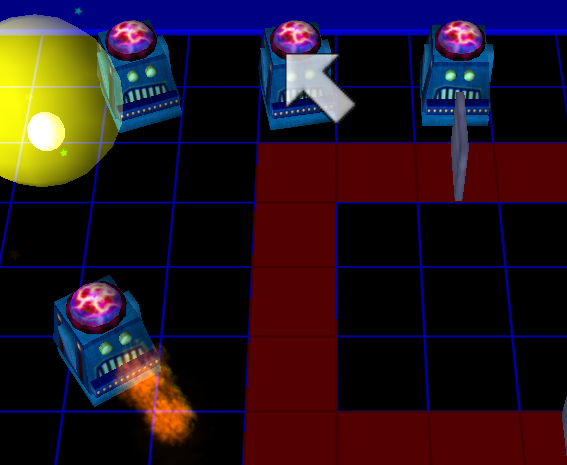
On the bright side, Master-Class Z-Bots were easy enough to implement. On the downside, I'm not sure what values do what yet, which resulted in the bottom-most one firing at me roughly four hundred times per second the moment the level started.
On a more serious note, Master-Bots are going well. Going to figure out what values do what before releasing them though, I think.
Posted: Fri Nov 29, 2013 1:25 am
by LexieTheFox
Qloof234 wrote:
On the bright side, Master-Class Z-Bots were easy enough to implement. On the downside, I'm not sure what values do what yet, which resulted in the bottom-most one firing at me roughly four hundred times per second the moment the level started.
On a more serious note, Master-Bots are going well. Going to figure out what values do what before releasing them though, I think.
Woohoo, go Qloof!
My pink fox cheers for you, look at that smile.
Posted: Fri Nov 29, 2013 1:32 am
by Qloof234
Heh, thank you!
On that note, I've updated the WOP notes and Editor files with the Master-Class Z-Bot NPC and additional .wop/CMD information based on the last few posts.
Going to look into Suction Tube corner and Brr pads soon-ish.
Posted: Fri Nov 29, 2013 2:23 am
by StinkerSquad01
Wasn't there a logic thing in PowerWop for Brr pads?
Posted: Fri Nov 29, 2013 2:26 am
by Qloof234
Aaaaagh. I've been trying to work out Suction Tube corners for a while, and... well...
Getting the logic to work in-game is a fairly straightforward matter. However, no matter what I do, I can't get the Editor Tools to swap the model in properly. I
think it's because the model name is too close to the regular Suction Tube (ftr, the corner is !SuctubeX and straight pieces are !Suctube).
Sooo... I don't know if corner pieces are going to be happening. Properly, at least. Looks like that'll have to wait for the PoTZ Editor, sorry guys.

As for Ice floats, I haven't looked at those yet, but I suspect they'll be fairly straightforward to figure out.
EDIT: not a dp
Posted: Fri Nov 29, 2013 5:00 am
by StinkerSquad01
Oh yeah, speaking of model swapping, I think you put in the wrong model in the conversion data for Mothership. In the editor it appears as a fountain, but the conversion data says something different (I don't remember since I corrected it) which led to it not working.
Posted: Fri Nov 29, 2013 6:06 am
by Qloof234
wait did i actually
WHOOPS
Fixing that, hang on.

Posted: Fri Nov 29, 2013 9:09 pm
by Qloof234
Bah, I've tried working out Brr Floats as well... No dice.
Either they don't swap models correctly or they don't appear in-game at all.
In the meantime, for what it's worth, I'm looking at what I can do to make a placeholder thing for Suction Tube corners. It won't involve a proper model-swap, cause that doesn't seem to work, but I'm trying to figure out something so that we can use them in the meantime.
EDIT: Well, it's not the prettiest looking thing, and I'm still working on it, but...

Using the Wooden Box model from MoFI. I still need to get legit data values down for directions, but yeah. This is a thing.
Posted: Sat Nov 30, 2013 1:56 am
by MyNameIsKooky
Well, for what it's worth, I have a wop resembling a Brr Float. It just uses the !Barrel1 model instead. Also, you can't slide across it. I guess you'll have to use some sort of special floor logic for that.
Posted: Sat Nov 30, 2013 9:00 am
by Krishiv738
I found somthing about datas of Cmd 12
Data 1: volume
Data 2: ???
Data 3: speed
Data 4: ???
Posted: Sat Nov 30, 2013 11:14 pm
by LexieTheFox
Armed with that knowledge, does anyone know (I know, it's relatively new. I'm trying myself to find this out, but just incase)
Does anyone know what to set Stars End to with Cmd 12 to make it slow down to a shocking like aspect? I'm using it for something that happens at the Mythical Summit. But when I fired the cmd all it did was "erase" the music entirely.
Posted: Sun Dec 01, 2013 4:24 am
by Krishiv738
LexieTheFox wrote:Armed with that knowledge, does anyone know (I know, it's relatively new. I'm trying myself to find this out, but just incase)
Does anyone know what to set Stars End to with Cmd 12 to make it slow down to a shocking like aspect? I'm using it for something that happens at the Mythical Summit. But when I fired the cmd all it did was "erase" the music entirely.
Dd you set the volume or remained it 0?
Posted: Sun Dec 01, 2013 7:01 pm
by Fluffshery
For the suction tube corner pieces, is there any way you could copy the model but rename it? You could call it something like !TubeCorner instead of !SuctubeX.
Posted: Sun Dec 01, 2013 8:25 pm
by Qloof234
I don't think so, since the shorthand model names (the ones starting with !) seem to be in the game's .exe itself.
Everyone with the PoTZ player would have to make that change to the executable in order for them to work.
EDIT: Rather, it'd be possible, but whether or not it'd be worth the effort is open to debate.
Posted: Sun Dec 01, 2013 8:45 pm
by Fluffshery
Aha. I guess we'll just have to wait for the PotZ editor.
Posted: Sun Dec 01, 2013 9:02 pm
by Qloof234
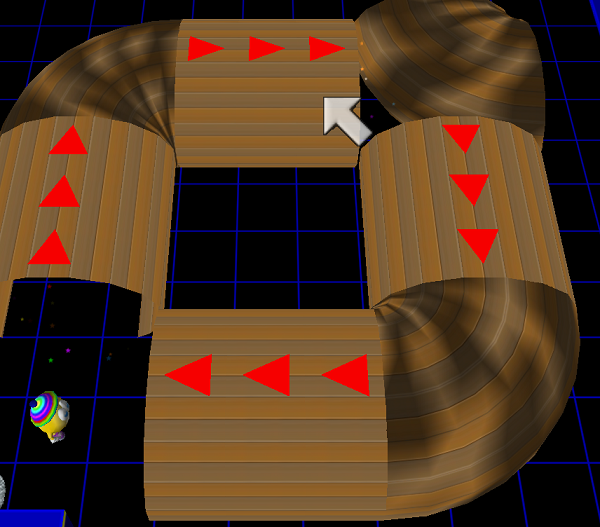
Well, ignoring the incorrect rotation on the top-right one, this confirms that it's possible to switch the model name for anyone proficient enough with a Hex editor.
This also confirms that suction tubes look kind of... weird when they aren't using the Z-Bot gates.