Page 1 of 1
Really crazy harddisk.
Posted: Sun Apr 27, 2008 5:40 pm
by Blast!10
Hi hi again. And yes, I have ANOTHER problem with my computer. This time it's about the hard disk.

Whenever I try to run RTW, my harddisk starts making a noise. It's like the normal noise it makes, except it's a bit louder.
RTW runs perfectly well (no lagging) except for this problem.
It happens in other operations as well (see attached picture for a list I put on my desktop) but as stated in the list below, RTW does more harm than everything else.
Please, if you can, help me fix this problem as it prevents me from playing this game.
 The previous problem with my monitor's stupidity has been completely fixed by replacing the computer's power cable. Yay black cable!
Re: Really crazy harddisk.
Posted: Mon Apr 28, 2008 8:32 am
by tyteen4a03
Blast!10 wrote:Hi hi again. And yes, I have ANOTHER problem with my computer. This time it's about the hard disk.
Whenever I try to run RTW, my harddisk starts making a noise. It's like the normal noise it makes, except it's a bit louder.
RTW runs perfectly well (no lagging) except for this problem.
It happens in other operations as well (see attached picture for a list I put on my desktop) but as stated in the list below, RTW does more harm than everything else.
Please, if you can, help me fix this problem as it prevents me from playing this game.
The previous problem with my monitor's stupidity has been completely fixed by replacing the computer's power cable. Yay black cable!
That's mean your HDD is getting old!Save your files FAST!!!
And you may try to change the speaker,or the sound card

Posted: Mon Apr 28, 2008 9:01 am
by Lillie
Maybe you need to download some updated drivers for your sound and graphics card?

Right click on "My Computer" and then select "Properties" and then click on the "Hardware" tab and there you will find the names of your graphics and sound card. Go to the manufacturer's website and you should be able to download all the latest drivers for your particular model. You must have the correct model number, so makes sure you write down all the correct numbers that follow your graphic/sound card name!

re: really crazy hard disk
Posted: Wed Apr 30, 2008 10:59 pm
by VirtLands
Hi Blast!10,
I have a few ideas of how to reduce that disk thrashing noise.
You'll need to defragment your disk drive, download some trial
versions of some programs...
A: If you're running Windows Vista, download "Vista Manager",
http://yamicsoft.com/vistamanager/
Use Vista Manager to defragment your Drive C, ...
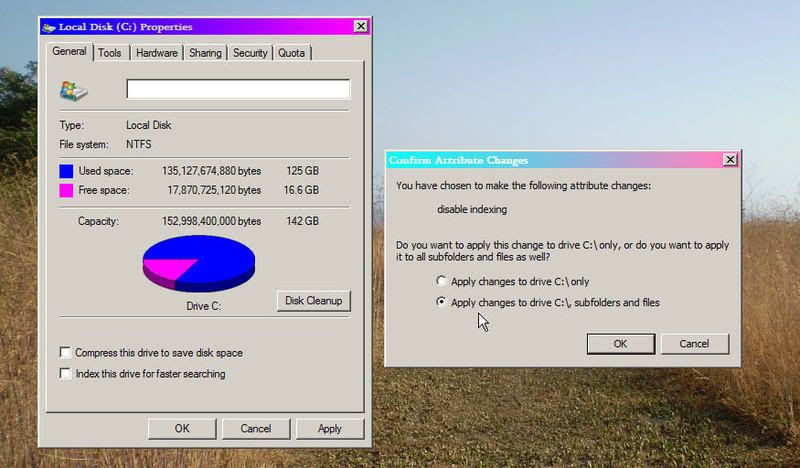
you can also use it turn turn off disk indexing.
B: If you're not on Windows Vista, then try some other program
to defragment, such as "O & O Defrag 10 Pro Edition"
http://oo-software.com/home/en/download/
C: You may also try this:
Back up all your precious files, and...
buy another hard drive.
D: If you wish to disable disk-indexing, here's another way to do it:
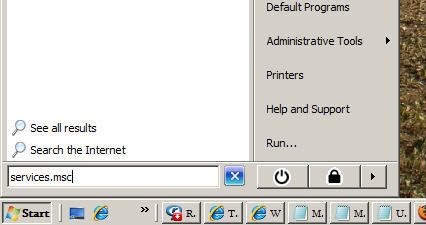
1. Run "services.msc"
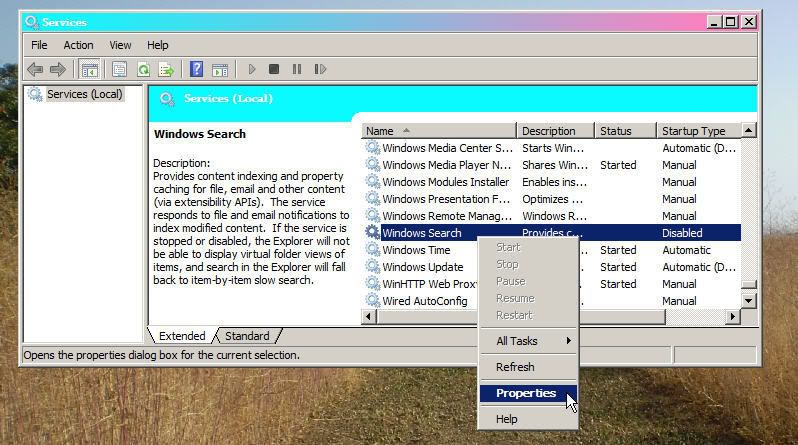
2. Right Click on "Windows Search", then click "Properties"
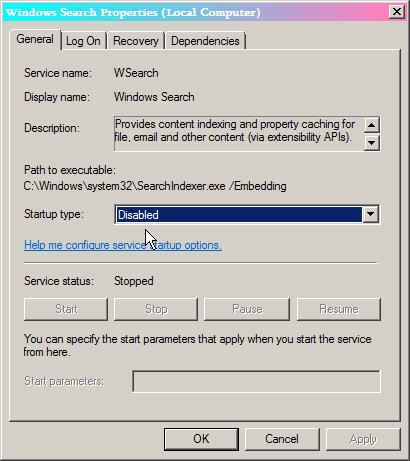
3. And then,... disable it. 
E: Good-Luck.
Posted: Sat May 03, 2008 5:31 am
by Blast!10
Umm... I have Local Disk (C:
) and Local Disk (D:
).
I'm running XP with about 8 GB left on drive C.
What's really weird is that it happens only with some programs. RTW, iTunes, My Computer, and Send To > caused it, but even a program as heavy as The Sims 2 (2.8 GB) didn't cause it.

This reminds me of one more thing that puzzles me.
It happens quite rarely, but sometimes, at startup, my computer gets stuck at a DOS screen which ends like that:
Boot from CD:
Boot from CD:
That's it. I can only press Enter and then another "Boot from CD: " appears. The only useful thing I can do is restart my computer in the UNSAFE way.
Posted: Sat May 03, 2008 12:40 pm
by Shadow
Have you ever forgot a CD and tried to boot it up?
Check your boot sequence. (in bios)