Power Wop: Easily make your own wops! [ALPHA 2]
Posted: Sun Nov 24, 2013 5:49 am
Power Wop is a program I wrote that easily edits wop files. I don't mean to be too egotistical, but I think it's great, especially when compared to editing wops manually (i.e. via Hex Editor). Here's why...
1. You can edit wops more quickly and more efficiently.
2. It's much easier to see what you're doing.
3. No need to learn how to edit wops manually.
Now that you can make your own wops, the Wop Request topic is now obsolete! There's no longer any need to wait for other people to make your wops for you! Plus, you'll be able to keep your insane wops a secret until you release your adventure!
Download link for Power Wop (alpha version 2): https://www.dropbox.com/s/6w5nu3aysnilp ... Alpha2.zip
IMPORTANT: This is an early version of Power Wop. As such, it does not yet interpret certain wop attributes as floating point values. Due to this, some decimal-based settings like XScale, YAdjust, and ScaleAdjust may look incorrect in Power Wop. However, they will still be correct in WAE assuming they aren't edited incorrectly in Power Wop. All other settings appear as they should, though!
-=-=- IMPORTANT STUFF ABOUT WOPS IN GENERAL -=-=-
As you may know, the files that the Wonderland Adventures Editor (i.e. WAE) reads object data from are the ".wop" files, found in the "Data\Editor\ObjectPresets" folder. When a wop file (sometimes just called a "wop") is loaded into the WAE, many things are determined. When an object is selected for placement, its wop determines the default values for each setting of the object. Some settings include TextureName, XScale, and Data0. The wop also determines which settings are editable by adding "adjusters" which an adventure designer can click to change various values of the wop. Sadly, not every setting in Wonderland Adventures has an adjuster equivalent in the WAE, and most of the time, wops lack certain adjusters. This is where wop editing comes in.
People edit wops for three reasons...
1. To add more adjusters to the wop for more flexibility in the WAE.
2. To change the default values in the wop to extraneous ones: for example, setting the default color of a GloveCharger to 8, causing it to be a rainbow magic charger in the WAE by default.
3. To change the model of an object. This technique is most often referred to as "modelswapping". It often creates very amusing and unusual results in-game. But some objects, like Chompers and Stinker NPCs, cannot be modelswapped, otherwise they cause errors in-game.
Data is interpreted from wops in three different ways...
1. As a signed integer.
2. As a floating point (i.e. a number with a decimal point). In the WAE, decimal-based values use the IEEE-754 single precision floating-point format.
3. As a string (i.e. letters and numbers).
Four bytes in the wop file are allocated to each setting (except for strings, which may need more). As such, there is a limit to the maximum value of some settings, but generally you shouldn't be very concerned.
Each wop has two values that determine how its object behaves in-game. These two values are Type and SubType. The combination of Type and SubType are referred to as an object's logic.
-=-=- HOW TO USE POWER WOP -=-=-
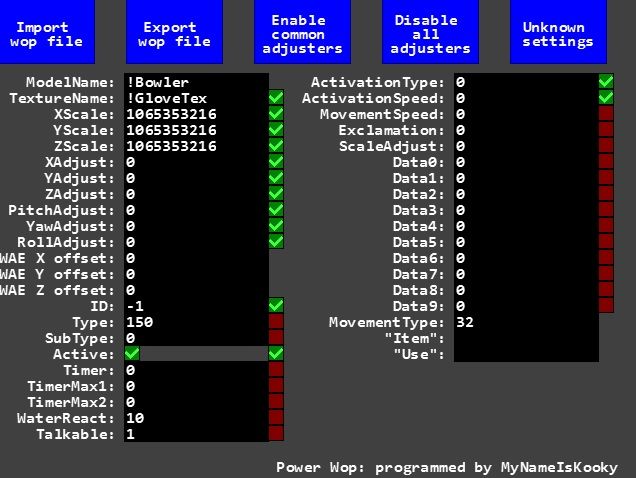
Power Wop can edit any aspect of any wop file. The program itself may look daunting at first, but it's relatively simple to handle...
- Click on the black text fields to edit the text inside.
- Click on the red/green checkboxs to toggle whether they're checked or unchecked.
- The blue squares with text inside are buttons which you can click to make something happen.
Considering that pretty much all users of this program will be adventure designers, you should be pretty familiar with most of the settings for objects.
Here's what you need to know to be able to use Power Wop...
- The text fields determine the default values for each setting.
- The checkboxes to the right of each text field determine whether to include the setting in the wop as an adjuster. Careful: Having more than 27 adjusters enabled will cause errors in the WAE!
- Click on the "Import wop file" button to copy data from an existing wop file into Power Wop.
- Click on the "Export wop file" button to export the data from Power Wop into a wop file that the WAE can use. Note that this process takes about ten seconds or so and causes the program to freeze until it finishes. There's not much I can do about that, so I apologize.
- Click on the "Enable common adjusters" button to enable the adjusters most often desired in wops.
- Click on the "Disable all adjusters" button to disable all adjusters (duh).
- Click on the "Unknown settings" button to edit the settings that have unknown functions. Experiment with these a bit if you wish. You just might discover something!
Remember that modelswaps on certain object logics cause errors in-game.
-=-=- VALID MODELS AND TEXTURES -=-=-
-=- VALID MODELS -=-
!Barrel1
!Barrel2
!Bowler
!Busterfly
!Button
!Cage
!Chomper
!Coin
!ColourGate
!Cuboid
!CustomItem
!Door
!Fence1
!Fencepost
!FireFlower
!Fountain
!Gem
!GlowWorm
!Item
!Key
!None
!NPC
!Obstacle01 (Rock1)
!Obstacle02 (Rock2)
!Obstacle05 (Flower1)
!Obstacle06 (Flower2)
!Obstacle10 (Mushroom)
!Obstacle15 (Bare Tree)
!Obstacle16 (Evergreen)
!Obstacle17 (EvergreenSnow)
!Obstacle18 (LeafTree1 Fall)
!Obstacle19 (LeafTree1 Green)
!Obstacle20 (LeafTree2 Pink)
!Obstacle21 (LeafTree2 Apple)
!Obstacle25 (BridgeEnd)
!Obstacle26 (Canopy)
!Obstacle27 (Streetlight)
!Obstacle28 (Pillar)
!Obstacle29 (Ladder)
!Obstacle30 (Table)
!Obstacle31 (Chair)
!Obstacle32 (Bed)
!Obstacle33 (Bookshelf)
!Obstacle34 (Arcade Machine)
!Obstacle35 (Pyramid)
!Obstacle36 (Cottage)
!Obstacle37 (Townhouse 1a)
!Obstacle38 (Townhouse 1b)
!Obstacle39 (Townhouse 2a)
!Obstacle40 (Townhouse 2b)
!Obstacle41 (Windmill Main)
!Obstacle42 (Windmill Rotor)
!Rubberducky
!Scritter
!Sign
!Spring
!Square
!Star
!StarGate
!SteppingStone
!StinkerWee
!Teleport
!Thwart
!Transporter
!Turtle
!Void
!WaterFall
!Wisp
-=- VALID TEXTURES -=-
!Cottage
!Door
!Fence
!FireTrap
!GloveTex
!None
!Townhouse
!Windmill
-=-=- LIST OF ACTIVATIONTYPES -=-=-
0: Does nothing.
1: GrowZ.
2: GrowXYZ.
3: GrowXY.
11: Gate (default).
12: Bridge, sinks 1 unit.
13: Bridge, sinks 2 units.
14: Bridge, sinks 3 units.
15: Bridge, sinks 4 units.
16: Bridge, sinks 5 units (default bridge movement).
21: Fade.
31: Cage.
41: Dungeon Door.
-=-=- LIST OF MOVEMENTTYPES -=-=-
30: Scritter range 0.
31: Scritter range 1.
32: Scritter range 2 (default for scritters).
33: Scritter range 3.
34: Scritter range 4.
41: Start moving north, turn left at walls.
42: Start moving north, turn right at walls.
43: Start moving east, turn left at walls.
44: Start moving east, turn right at walls.
45: Start moving south, turn left at walls.
46: Start moving south, turn right at walls.
47: Start moving west, turn left at walls.
48: Start moving west, turn right at walls.
71: Start moving north, bounce off walls.
72: Start moving northeast, bounce off walls.
73: Start moving east, bounce off walls.
74: Start moving southeast, bounce off walls.
75: Start moving south, bounce off walls.
76: Start moving southwest, bounce off walls.
77: Start moving west, bounce off walls.
78: Start moving northwest, bounce off walls.
-=-=- LIST OF LOGICS THAT ARE UNSTABLE WITH MODELSWAPS -=-=-
-=-KEY-=-
Type,SubType: Result.
110,0: Stinker NPC.
120,0: Wee Stinker.
220,0: Dragon Turtle.
230,0: FireFlower.
250,0: Chomper.
290,0: Thwart.
320,0: Void.
-=-=- LIST OF OBJECT LOGICS -=-=-
Thanks to cbloopy and Qloof for retrieving the MOFI and POTZ object logics respectively.
-=-KEY-=-
Type,SubType: Result.
0,0: Static and not solid.
1,0: Player?
2,0: Hat/Shadow which follows Player?
10,0: Gate.
10,1: Cottage Door.
10,2: Dungeon Door.
10,9: Auto-Door (POTZ).
11,0: Tollgate.
20,0: Fire.
30,0: Teleporter.
40,0: Bridge.
45,0: Trail Lead (POTZ).
46,0: Trail Tail (POTZ).
51,0: Magic Shooter (MOFI).
52,0: Meteor (MOFI).
54,0: Magic Mirror (MOFI).
90,0: Colour Square.
90,1: Colour Round.
90,2: Colour DiamondOnce.
90,3: Colour Diamond.
90,4: Colour Star.
90,5: ColX2Y Square.
90,6: ColX2Y Round.
90,7: ColX2Y DiamondOnce.
90,8: ColX2Y Diamond.
90,9: ColX2Y Star.
90,10: LevelExit.
90,11: NPC Modifier.
90,12: Fake Stinker Exit.
90,13: Adventure Star.
90,14: Adventure Star (Used).
90,15: General Command.
90,16: Rotator.
90,32: InvColour Square.
90,33: InvColour Round.
90,34: InvColour DiamondOnce.
90,35: InvColour Diamond.
90,36: InvColour Star.
90,37: InvColX2Y Square.
90,38: InvColX2Y Round.
90,39: InvColX2Y DiamondOnce.
90,40: InvColX2Y Diamond.
90,41: InvColX2Y Star.
90,42: Rotator Inv.
110,0: Stinker NPC.
120,0: Wee Stinker.
130,12: Stinker Exit.
140,0: Cage.
150,0: Scritter.
151,0: Rainbow Bubble (POTZ).
160,0: Wall.
161,0: Waterfall.
162,0: Cottage.
163,0: Windmill Rotor.
164,0: Fountain.
165,0: Arcade.
170,0: Gold Star.
171,0: Coin.
172,0: Key/Keycard.
173,0: Gem.
174,0: Token.
179,0: Custom Item.
180,0: Sign.
190,0: Splish.
190,1: Steam.
190,3: Spray.
190,4: Sparks (POTZ).
190,5: Blink Effect (POTZ).
190,6: CircleBurst (POTZ).
190,7: Spiral (POTZ).
200,0: Normal Magic Charger.
200,1: Faint Magic Charger (POTZ).
210,0: Transporter.
220,0: Dragon Turtle.
230,0: FireFlower.
240,0: Barrel Reg.
241,0: Barrel TNT.
242,0: Cuboid.
250,0: Chomper.
250,1: Water Chomper (POTZ).
260,0: Spikeyball.
270,0: Busterfly/Glowworm.
280,0: Spring.
281,0: Suction Tube (POTZ).
290,0: Thwart.
300,0: Brr Float.
301,0: Rainbow Float (POTZ).
310,0: Rubber Ducky.
320,0: Void.
330,0: Wysp.
340,0: Tentacle (MOFI).
370,0: Green Crab (MOFI).
370,1: Red Crab (MOFI).
380,0: Ice Troll (MOFI).
390,0: Kaboom! (MOFI).
400,0: Baby Boomer (MOFI).
410,0: Flip Bridge (MOFI).
421,0: Scouge (MOFI).
422,0: UFO (MOFI).
423,0: Retro Z-Bot (MOFI).
424,0: Laser Gate (MOFI).
425,0: Rainbow Coin (MOFI).
430,0: ZipBot (POTZ).
431,0: ZapBot (POTZ).
432,0: MooBot (POTZ).
434,0: Mothership (POTZ).
441,0: Sunsphere (POTZ).
450,0: Lurker (POTZ).
460,0: BurstFlower (POTZ).
470,0: Ghost (POTZ).
471,0: Wraith (POTZ).
1. You can edit wops more quickly and more efficiently.
2. It's much easier to see what you're doing.
3. No need to learn how to edit wops manually.
Now that you can make your own wops, the Wop Request topic is now obsolete! There's no longer any need to wait for other people to make your wops for you! Plus, you'll be able to keep your insane wops a secret until you release your adventure!

Download link for Power Wop (alpha version 2): https://www.dropbox.com/s/6w5nu3aysnilp ... Alpha2.zip
IMPORTANT: This is an early version of Power Wop. As such, it does not yet interpret certain wop attributes as floating point values. Due to this, some decimal-based settings like XScale, YAdjust, and ScaleAdjust may look incorrect in Power Wop. However, they will still be correct in WAE assuming they aren't edited incorrectly in Power Wop. All other settings appear as they should, though!
-=-=- IMPORTANT STUFF ABOUT WOPS IN GENERAL -=-=-
As you may know, the files that the Wonderland Adventures Editor (i.e. WAE) reads object data from are the ".wop" files, found in the "Data\Editor\ObjectPresets" folder. When a wop file (sometimes just called a "wop") is loaded into the WAE, many things are determined. When an object is selected for placement, its wop determines the default values for each setting of the object. Some settings include TextureName, XScale, and Data0. The wop also determines which settings are editable by adding "adjusters" which an adventure designer can click to change various values of the wop. Sadly, not every setting in Wonderland Adventures has an adjuster equivalent in the WAE, and most of the time, wops lack certain adjusters. This is where wop editing comes in.
People edit wops for three reasons...
1. To add more adjusters to the wop for more flexibility in the WAE.
2. To change the default values in the wop to extraneous ones: for example, setting the default color of a GloveCharger to 8, causing it to be a rainbow magic charger in the WAE by default.
3. To change the model of an object. This technique is most often referred to as "modelswapping". It often creates very amusing and unusual results in-game. But some objects, like Chompers and Stinker NPCs, cannot be modelswapped, otherwise they cause errors in-game.
Data is interpreted from wops in three different ways...
1. As a signed integer.
2. As a floating point (i.e. a number with a decimal point). In the WAE, decimal-based values use the IEEE-754 single precision floating-point format.
3. As a string (i.e. letters and numbers).
Four bytes in the wop file are allocated to each setting (except for strings, which may need more). As such, there is a limit to the maximum value of some settings, but generally you shouldn't be very concerned.
Each wop has two values that determine how its object behaves in-game. These two values are Type and SubType. The combination of Type and SubType are referred to as an object's logic.
-=-=- HOW TO USE POWER WOP -=-=-
Power Wop can edit any aspect of any wop file. The program itself may look daunting at first, but it's relatively simple to handle...
- Click on the black text fields to edit the text inside.
- Click on the red/green checkboxs to toggle whether they're checked or unchecked.
- The blue squares with text inside are buttons which you can click to make something happen.
Considering that pretty much all users of this program will be adventure designers, you should be pretty familiar with most of the settings for objects.
Here's what you need to know to be able to use Power Wop...
- The text fields determine the default values for each setting.
- The checkboxes to the right of each text field determine whether to include the setting in the wop as an adjuster. Careful: Having more than 27 adjusters enabled will cause errors in the WAE!
- Click on the "Import wop file" button to copy data from an existing wop file into Power Wop.
- Click on the "Export wop file" button to export the data from Power Wop into a wop file that the WAE can use. Note that this process takes about ten seconds or so and causes the program to freeze until it finishes. There's not much I can do about that, so I apologize.
- Click on the "Enable common adjusters" button to enable the adjusters most often desired in wops.
- Click on the "Disable all adjusters" button to disable all adjusters (duh).
- Click on the "Unknown settings" button to edit the settings that have unknown functions. Experiment with these a bit if you wish. You just might discover something!
Remember that modelswaps on certain object logics cause errors in-game.
-=-=- VALID MODELS AND TEXTURES -=-=-
-=- VALID MODELS -=-
!Barrel1
!Barrel2
!Bowler
!Busterfly
!Button
!Cage
!Chomper
!Coin
!ColourGate
!Cuboid
!CustomItem
!Door
!Fence1
!Fencepost
!FireFlower
!Fountain
!Gem
!GlowWorm
!Item
!Key
!None
!NPC
!Obstacle01 (Rock1)
!Obstacle02 (Rock2)
!Obstacle05 (Flower1)
!Obstacle06 (Flower2)
!Obstacle10 (Mushroom)
!Obstacle15 (Bare Tree)
!Obstacle16 (Evergreen)
!Obstacle17 (EvergreenSnow)
!Obstacle18 (LeafTree1 Fall)
!Obstacle19 (LeafTree1 Green)
!Obstacle20 (LeafTree2 Pink)
!Obstacle21 (LeafTree2 Apple)
!Obstacle25 (BridgeEnd)
!Obstacle26 (Canopy)
!Obstacle27 (Streetlight)
!Obstacle28 (Pillar)
!Obstacle29 (Ladder)
!Obstacle30 (Table)
!Obstacle31 (Chair)
!Obstacle32 (Bed)
!Obstacle33 (Bookshelf)
!Obstacle34 (Arcade Machine)
!Obstacle35 (Pyramid)
!Obstacle36 (Cottage)
!Obstacle37 (Townhouse 1a)
!Obstacle38 (Townhouse 1b)
!Obstacle39 (Townhouse 2a)
!Obstacle40 (Townhouse 2b)
!Obstacle41 (Windmill Main)
!Obstacle42 (Windmill Rotor)
!Rubberducky
!Scritter
!Sign
!Spring
!Square
!Star
!StarGate
!SteppingStone
!StinkerWee
!Teleport
!Thwart
!Transporter
!Turtle
!Void
!WaterFall
!Wisp
-=- VALID TEXTURES -=-
!Cottage
!Door
!Fence
!FireTrap
!GloveTex
!None
!Townhouse
!Windmill
-=-=- LIST OF ACTIVATIONTYPES -=-=-
0: Does nothing.
1: GrowZ.
2: GrowXYZ.
3: GrowXY.
11: Gate (default).
12: Bridge, sinks 1 unit.
13: Bridge, sinks 2 units.
14: Bridge, sinks 3 units.
15: Bridge, sinks 4 units.
16: Bridge, sinks 5 units (default bridge movement).
21: Fade.
31: Cage.
41: Dungeon Door.
-=-=- LIST OF MOVEMENTTYPES -=-=-
30: Scritter range 0.
31: Scritter range 1.
32: Scritter range 2 (default for scritters).
33: Scritter range 3.
34: Scritter range 4.
41: Start moving north, turn left at walls.
42: Start moving north, turn right at walls.
43: Start moving east, turn left at walls.
44: Start moving east, turn right at walls.
45: Start moving south, turn left at walls.
46: Start moving south, turn right at walls.
47: Start moving west, turn left at walls.
48: Start moving west, turn right at walls.
71: Start moving north, bounce off walls.
72: Start moving northeast, bounce off walls.
73: Start moving east, bounce off walls.
74: Start moving southeast, bounce off walls.
75: Start moving south, bounce off walls.
76: Start moving southwest, bounce off walls.
77: Start moving west, bounce off walls.
78: Start moving northwest, bounce off walls.
-=-=- LIST OF LOGICS THAT ARE UNSTABLE WITH MODELSWAPS -=-=-
-=-KEY-=-
Type,SubType: Result.
110,0: Stinker NPC.
120,0: Wee Stinker.
220,0: Dragon Turtle.
230,0: FireFlower.
250,0: Chomper.
290,0: Thwart.
320,0: Void.
-=-=- LIST OF OBJECT LOGICS -=-=-
Thanks to cbloopy and Qloof for retrieving the MOFI and POTZ object logics respectively.
-=-KEY-=-
Type,SubType: Result.
0,0: Static and not solid.
1,0: Player?
2,0: Hat/Shadow which follows Player?
10,0: Gate.
10,1: Cottage Door.
10,2: Dungeon Door.
10,9: Auto-Door (POTZ).
11,0: Tollgate.
20,0: Fire.
30,0: Teleporter.
40,0: Bridge.
45,0: Trail Lead (POTZ).
46,0: Trail Tail (POTZ).
51,0: Magic Shooter (MOFI).
52,0: Meteor (MOFI).
54,0: Magic Mirror (MOFI).
90,0: Colour Square.
90,1: Colour Round.
90,2: Colour DiamondOnce.
90,3: Colour Diamond.
90,4: Colour Star.
90,5: ColX2Y Square.
90,6: ColX2Y Round.
90,7: ColX2Y DiamondOnce.
90,8: ColX2Y Diamond.
90,9: ColX2Y Star.
90,10: LevelExit.
90,11: NPC Modifier.
90,12: Fake Stinker Exit.
90,13: Adventure Star.
90,14: Adventure Star (Used).
90,15: General Command.
90,16: Rotator.
90,32: InvColour Square.
90,33: InvColour Round.
90,34: InvColour DiamondOnce.
90,35: InvColour Diamond.
90,36: InvColour Star.
90,37: InvColX2Y Square.
90,38: InvColX2Y Round.
90,39: InvColX2Y DiamondOnce.
90,40: InvColX2Y Diamond.
90,41: InvColX2Y Star.
90,42: Rotator Inv.
110,0: Stinker NPC.
120,0: Wee Stinker.
130,12: Stinker Exit.
140,0: Cage.
150,0: Scritter.
151,0: Rainbow Bubble (POTZ).
160,0: Wall.
161,0: Waterfall.
162,0: Cottage.
163,0: Windmill Rotor.
164,0: Fountain.
165,0: Arcade.
170,0: Gold Star.
171,0: Coin.
172,0: Key/Keycard.
173,0: Gem.
174,0: Token.
179,0: Custom Item.
180,0: Sign.
190,0: Splish.
190,1: Steam.
190,3: Spray.
190,4: Sparks (POTZ).
190,5: Blink Effect (POTZ).
190,6: CircleBurst (POTZ).
190,7: Spiral (POTZ).
200,0: Normal Magic Charger.
200,1: Faint Magic Charger (POTZ).
210,0: Transporter.
220,0: Dragon Turtle.
230,0: FireFlower.
240,0: Barrel Reg.
241,0: Barrel TNT.
242,0: Cuboid.
250,0: Chomper.
250,1: Water Chomper (POTZ).
260,0: Spikeyball.
270,0: Busterfly/Glowworm.
280,0: Spring.
281,0: Suction Tube (POTZ).
290,0: Thwart.
300,0: Brr Float.
301,0: Rainbow Float (POTZ).
310,0: Rubber Ducky.
320,0: Void.
330,0: Wysp.
340,0: Tentacle (MOFI).
370,0: Green Crab (MOFI).
370,1: Red Crab (MOFI).
380,0: Ice Troll (MOFI).
390,0: Kaboom! (MOFI).
400,0: Baby Boomer (MOFI).
410,0: Flip Bridge (MOFI).
421,0: Scouge (MOFI).
422,0: UFO (MOFI).
423,0: Retro Z-Bot (MOFI).
424,0: Laser Gate (MOFI).
425,0: Rainbow Coin (MOFI).
430,0: ZipBot (POTZ).
431,0: ZapBot (POTZ).
432,0: MooBot (POTZ).
434,0: Mothership (POTZ).
441,0: Sunsphere (POTZ).
450,0: Lurker (POTZ).
460,0: BurstFlower (POTZ).
470,0: Ghost (POTZ).
471,0: Wraith (POTZ).


 Well, I've added it to the list anyways, just in case.